ROM Filing System packer and extractor to let your Windows PC make RFS ROM images for the BBC Micro
Windows WinUI 3 Microsoft Store BBC Micro FreeBeebRFSMaker is a Windows application for packing files into a BBC Micro ROM Filing System image, and extracting files back out again. It handles both RFS formats: compressed (CompRFS), compatible with the comprom.pl v2.10 format by Greg Cook, and standard, uncompressed RFS. It produces sideways ROM images that can be used directly with a BBC Microcomputer or emulator.
To use it, simply drag and drop files from your PC onto the area labelled "Drop PC files here". The files will be listed
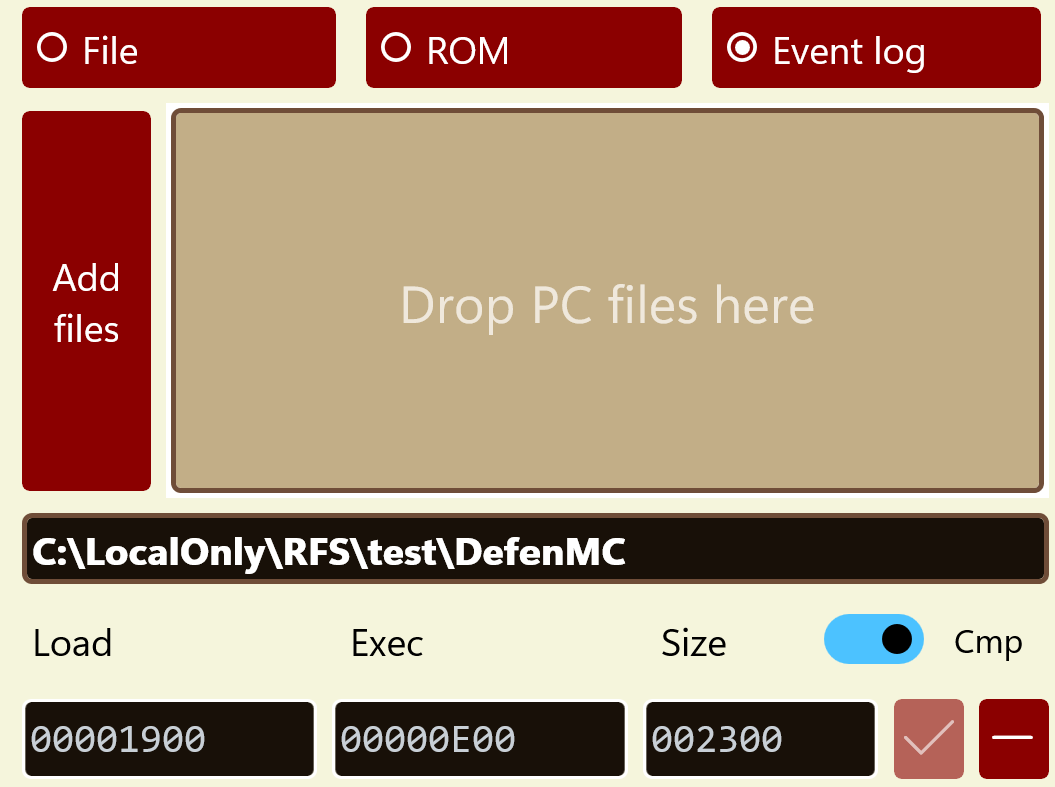
in the area below with their names, load and exec addresses, and sizes in bytes. The files in the list are compressed
into a ROM image. By using the radio buttons at the top you can see the content of the selected file from the list,
or the ROM image, or the Event Log, in the preview window, which takes up most of the left-hand side of the app. When
a file is shown, that preview window is also a hex editor — see Editing file content. If the
total file size after compression fits within a 16 KB ROM then the Save RFS ROM button, which shows how
many files are in the image, will be enabled, and you can choose where to save the ROM image with a
.rom extension. If you attempt to
add a file which will clash with the name of one already in the list, it will not be included and you will be informed
and given advice on workarounds.
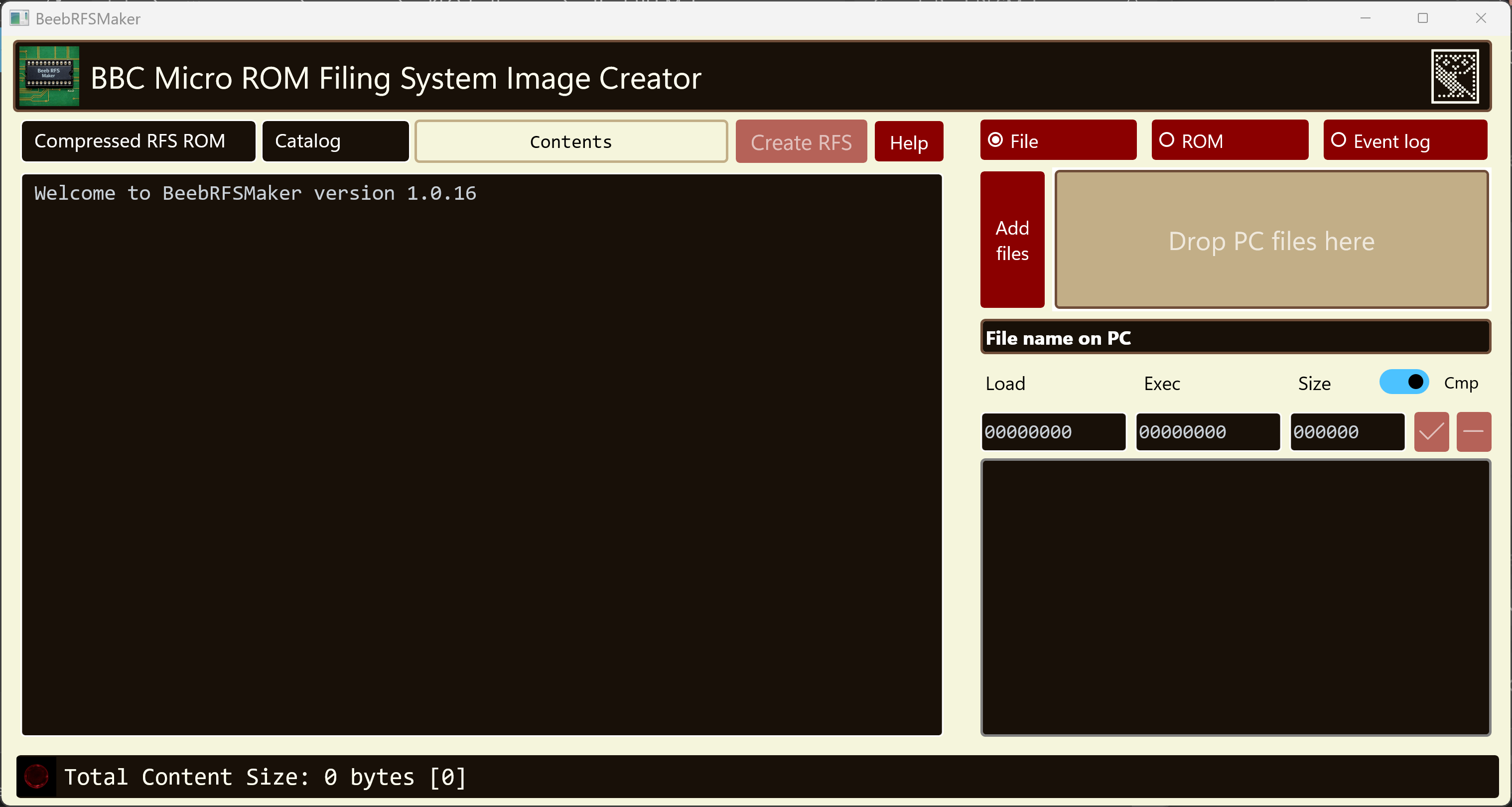
BeebRFSMaker launch screen
The Compressed / Uncompressed toggle chooses which RFS format to build. Compressed is the usual choice, since it fits far more into the same 16 KB; uncompressed produces a plain RFS ROM with no decompressor stub.
The most up-to-date version of this information will always be the online version.
.inf sidecar file formatWhen packing, BeebRFSMaker reads the accompanying .inf sidecar file for each PC file if one exists. When extracting, it creates one alongside each extracted file.
The .inf file is the de facto standard
for preserving BBC Micro file metadata on a modern PC filing system, and is recognised by BeebEm and most other emulators
and tools in the BBC Micro ecosystem.
Each .inf file is a single line of plain text with the following fields, separated by whitespace:
$.FILENAME LLLLLLLL EEEEEEEE SSSSSS
Where:
$.FILENAME — the BBC Micro filename, including the DFS directory prefix (usually $ for the default directory, not used in the cassette or ROM filing systems)FFFF1900)FFFF1900)Both addresses are written as eight hex digits, so a full 32-bit address is stated outright. Sidecar files are
read tolerantly, so the shorter four- and six-digit forms written by other tools, and by earlier versions of these
tools, are still accepted, with truncated high bits restored as needed. Existing .inf files therefore keep
working unchanged. Note that files extracted from a ROM image have no $. directory prefix, since the ROM
filing system has no directories.
The load address is the 6502 memory address at which the file should be loaded when transferred back to a BBC Micro.
The execution address is the address to jump to if the file is run with *RUN or CHAIN"".
For non-executable files such as data files these two addresses are often identical. Addresses are stored as 32-bit values to
accommodate the Master 128’s extended address space, though on a Model B only the lower 16 bits are significant.
Example — a BBC BASIC program called GAME:
$.GAME 00001900 00008023 003A4F
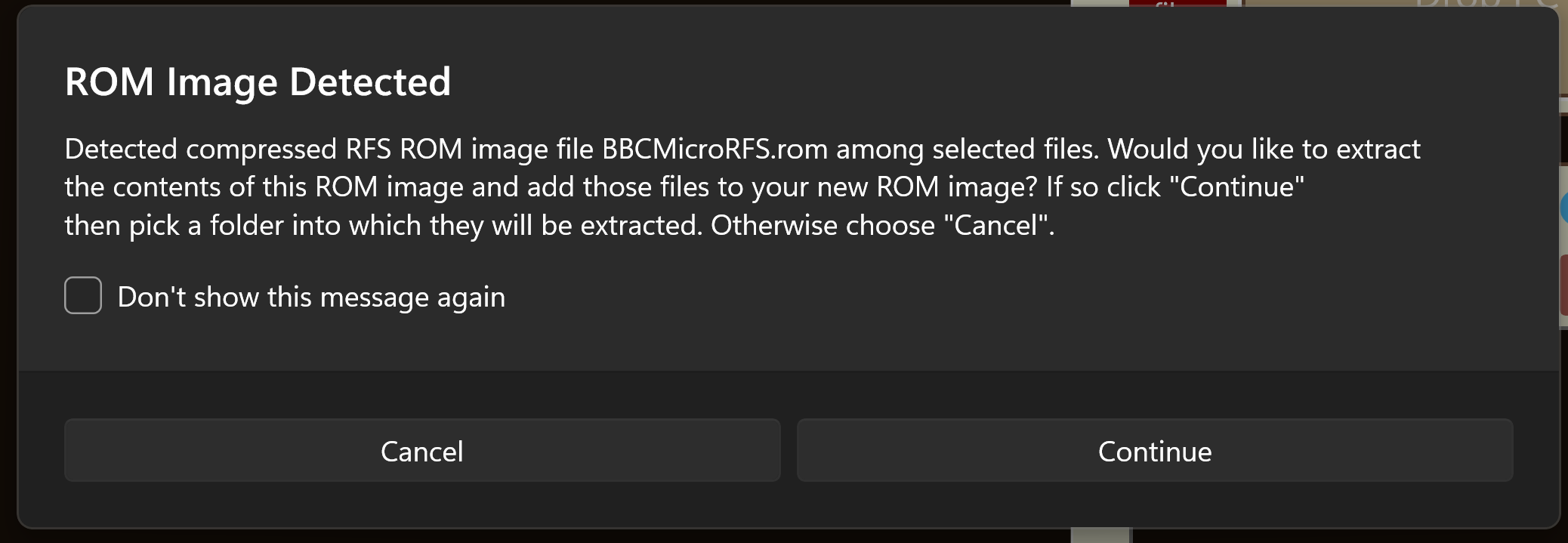
If you drop a .rom file onto the app it will offer to extract the content into a location of your choice, and optionally add those files to whatever is already in the list. Both compressed and uncompressed RFS ROMs are recognised, and the Event Log records which kind was detected and which files came out of it. You can also use this feature just to extract files from a compatible ROM image. The corresponding .inf file will be created during extraction.
With the File radio button selected, the preview pane on the left is a hex editor as well as a viewer. Click
anywhere in the hex column or the ASCII column of the selected file and type to change a byte. The two columns stay
in step, so overstriking 41 in the hex column shows A in the ASCII column, and typing
A in the ASCII column shows 41 in the hex column. The ASCII column accepts any printable
character from &20 to &7E; bytes outside that range are displayed as
¿ and have to be entered in the hex column.
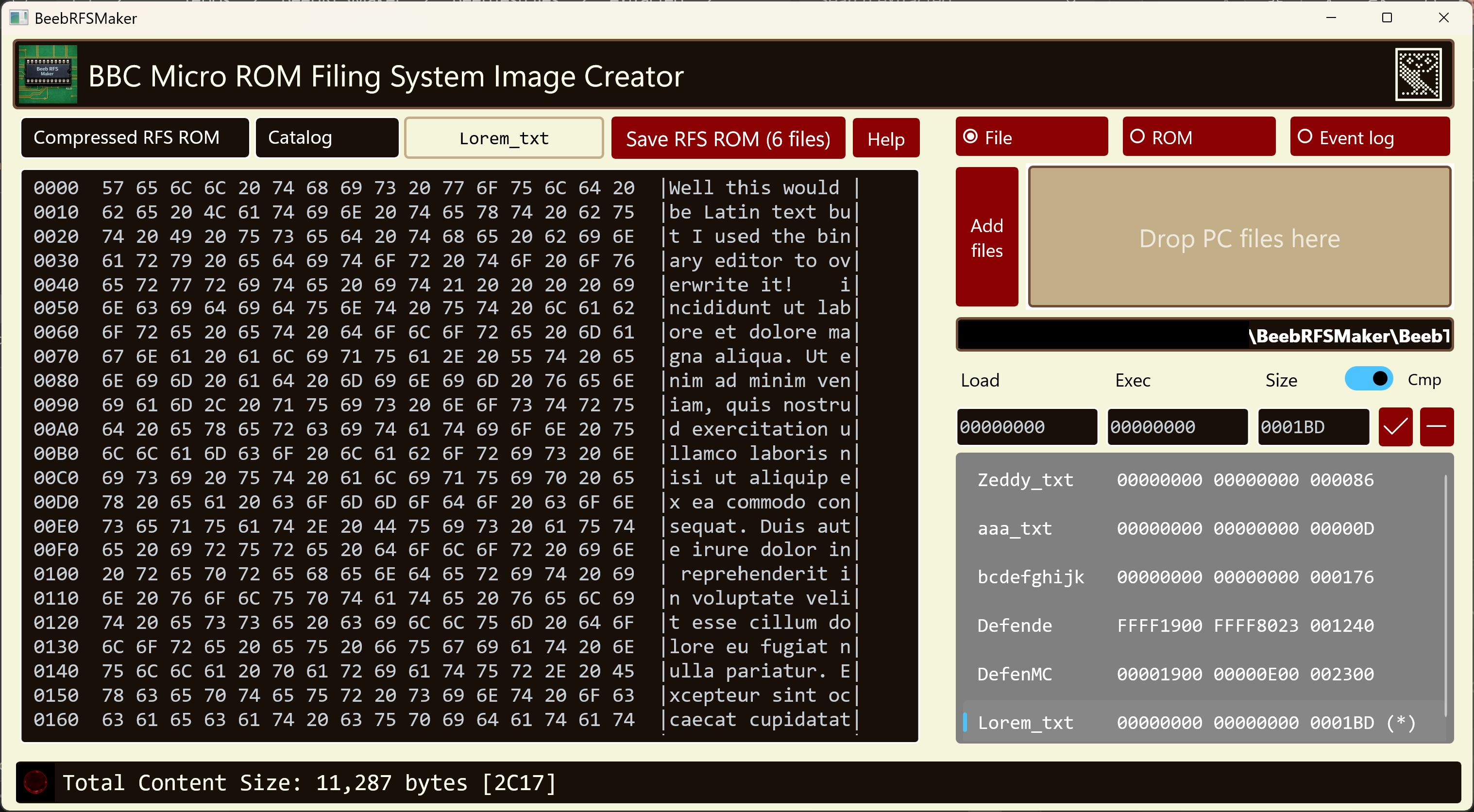
Editing the in-memory copy of a file before it is saved to a sideways ROM image
Editing is strictly overstrike: the byte under the cursor is replaced by the one you type and the file keeps exactly the length it had. There is no way to insert or delete bytes, which keeps each file’s load address, execution address and length valid without your having to adjust them by hand.
Files you have edited are marked with (*) in the file list, meaning that file now differs from the ROM
image last built from it. Press Apply to rebuild the image around your edits, at which point the markers
clear. The rebuild is deliberately not automatic: in a compressed ROM the whole file set shares a single dictionary,
so one changed byte can alter the compression of every file, and repacking on each keystroke would be both slow and
confusing to watch. Saving the ROM image applies any outstanding edits first, so what you save always matches what
you see.
Nothing is written back to the files on your PC. Edits apply only to the app’s in-memory copy of the file that goes into the ROM image, so the original on disk is untouched. To abandon an edit, remove the file from the list and add it again.
The ROM and Event Log views are read-only. A ROM image is regenerated from the file list every time it is built, so editing its bytes directly would only be undone by the next rebuild. The parts of the image that are yours to set — the ROM title and the catalogue title, the latter labelled Catalog in the app — have their own text boxes above the preview pane.
The Load and Exec fields beneath the file name are editable. Click into either, type a new address, and
press Enter or move away from the field: the address is written to the selected file and the ROM image is
rebuilt around it straight away. Both are shown in full as eight hex digits, so a host address such as
FFFF1900 can be read and typed exactly as the BBC states it, rather than in a shortened form that
leaves you guessing at the high bits.
Typing is overstrike here too: each keystroke replaces the digit under the cursor, so the field always holds
a complete address and can never be left half-finished. Only the hex digits 0–9 and
A–F are accepted.
The Size field alongside them is shown for reference but cannot be edited — a file’s length is whatever its contents amount to, and the hex editor above deliberately preserves it.
A BBC BASIC program dropped in without a .inf file beside it is now given the host addresses
FFFF1900 and FFFF8023 — PAGE and the BASIC entry point, marked as being
in the host rather than across the tube, which is what a program loaded from a ROM filing system wants.
Files taken off a .ssd or .dsd disk image — by
BBCReadDiskImage or a similar tool — arrive with the drive and directory
written into the PC file name, as 0_$.MAKERFS or 0_P.MakeRFS. Drop those in and the drive
and directory are stripped off, since a ROM filing system has no directories: they go in as MAKERFS and
MakeRFS. A name can no longer keep a dot either, which the BBC would read as a directory separator.
Where two files differ only by the directory they came from, their names collide once the directory is dropped. You
are offered the directory letter as a prefix so both can go in — the copy from P becomes
PMakeRFS — or you can decline and leave that file out. The root directory $ is never
offered as a prefix, since it says nothing about where a file came from.
A .inf file dropped alongside the file it describes is read for that file’s addresses and quietly
consumed, rather than being added to the ROM as a file in its own right. One dropped on its own asks what you meant,
and will still be added if that is what you want.
Rather than using old-style, UV-erasable EPROMs, I bought five compatible AT28C256-15PU EEPROMs for around $11 on Amazon. The "256" in the part number refers to its 256 Kbit capacity (32 KB), and the "-15" indicates a 150 ns access time. I use the upper 16 KB since the A14 address line is held high, making that half of the capacity visible to the Beeb. The chips linked to are second-hand; one arrived missing a leg and was discarded, but the rest all worked. I used the Xgecu T48 TL866-3G EEPROM Programmer with the downloadable Xgpro software to "burn" the EEPROM content. The EEPROMs I have created so far all worked in my actual BBC Micro.
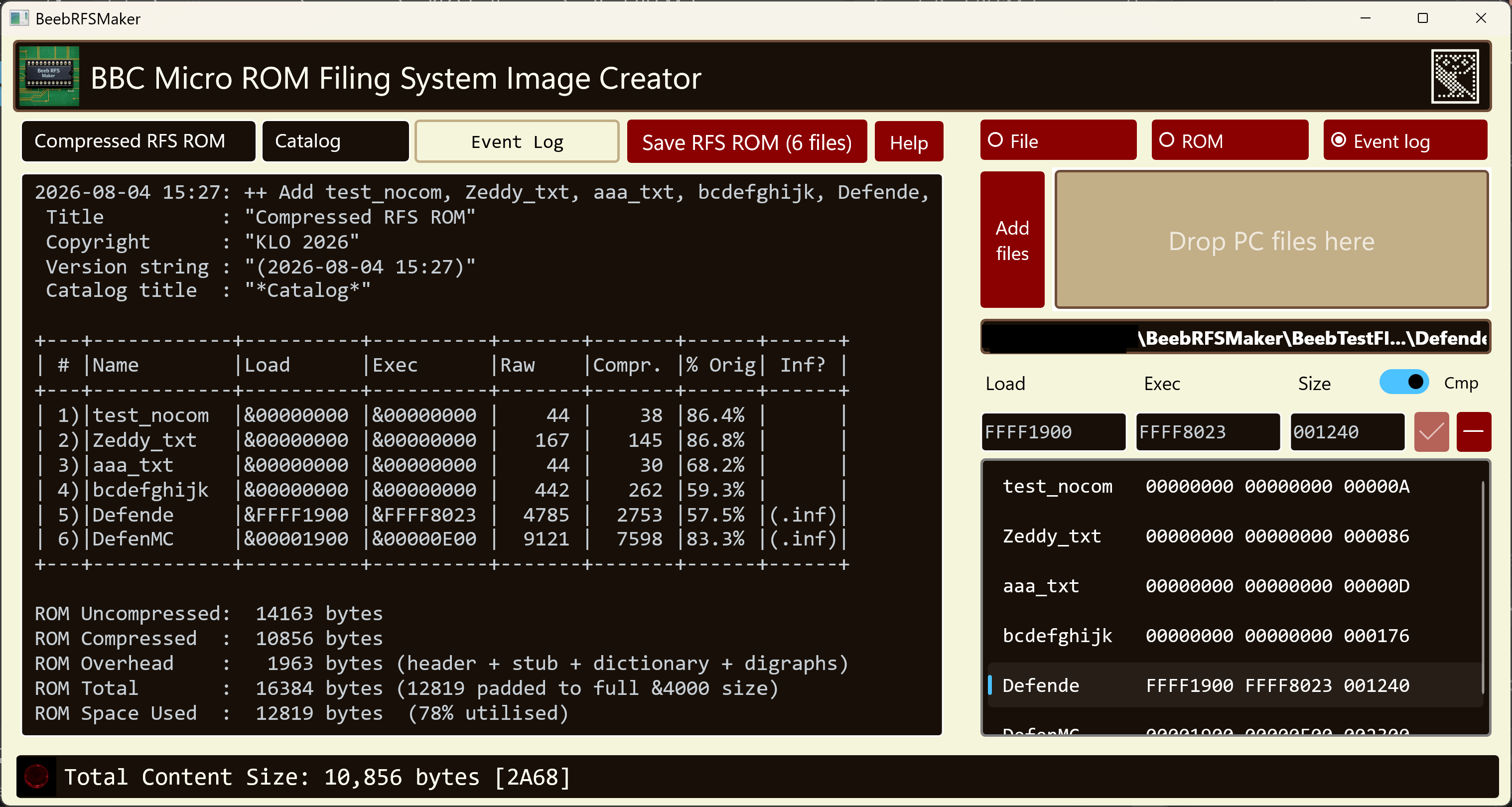
Packing a set of BBC Micro files into a 16 KB sideways ROM image
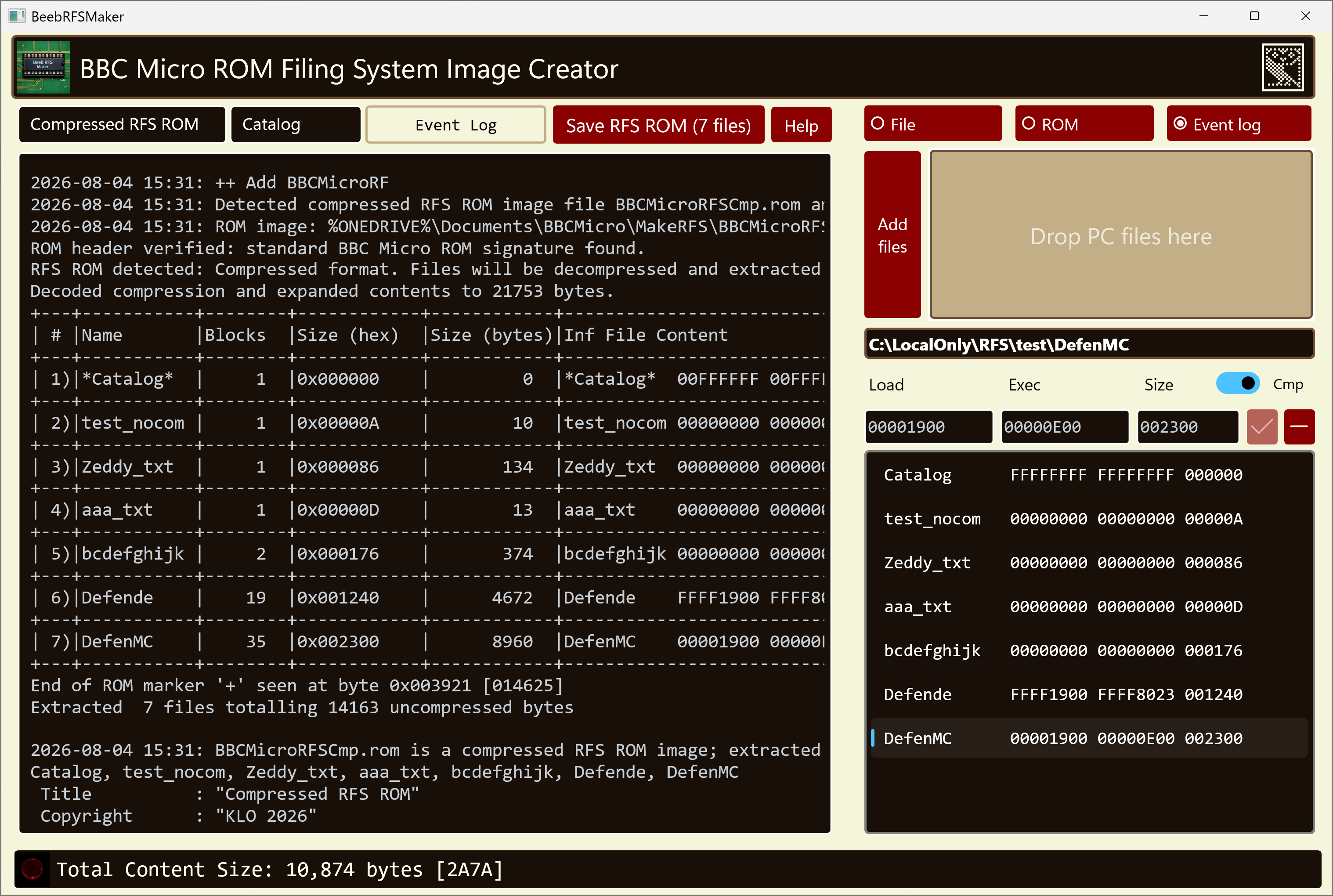
Extracting files from an existing CompRFS ROM image, with optional .inf sidecar files
Drag and drop a set of files onto the app, or pick them with the Add files button, and pack them into a standard 16 KB sideways ROM image. BBC Micro filenames, load addresses, and execution addresses are read from .inf sidecar files if present.
Build either a compressed (CompRFS) ROM or a standard, uncompressed RFS ROM from the same file list, using the Compressed / Uncompressed toggle.
Open any compatible RFS ROM image, compressed or uncompressed — the format is detected from the ROM header — and extract its files back to a folder, generating .inf sidecar files in the format that has become the de facto standard for preserving BBC Micro metadata — filename, load and execution addresses, and file length.
The preview pane doubles as a hex editor for the selected file. Overstrike bytes in either the hex or the ASCII column, then press Apply to rebuild the ROM image around your changes. Edits are made to the copy held for packing, so the files on your PC are never modified. See Editing file content.
Type a new load or execution address into its field and press Enter, and the ROM image is rebuilt around it. Both are shown in full as eight hex digits so a host address such as FFFF1900 reads as the BBC states it. The length is shown alongside but is not editable. See Editing load and execution addresses.
Files exported from a .ssd or .dsd image keep their BBC names: the 0_$. drive and directory prefix is stripped, and where two files clash the directory letter is offered as a prefix instead. Matching .inf files are read as metadata rather than packed. See Files exported from a disk image.
The pack output shows each file’s raw and compressed sizes so you can see at a glance how efficiently your files compress, and whether everything fits in the 16 KB slot.
Produces byte-identical ROM images to the original comprom.pl v2.10 Perl script by Greg Cook, so ROMs built with BeebRFSMaker work with any BBC Microcomputer or emulator such as BeebEm.
Customise the ROM title (shown by *ROMS) and the catalogue title (shown by *CAT), each in its own field above the preview pane. The catalogue title applies to compressed ROMs.
A corresponding command-line tool, BeebRFSTool, which uses the same pack and extract classes as the GUI app, provides a full command-line interface for scripting and automation, compatible with batch files and build pipelines.
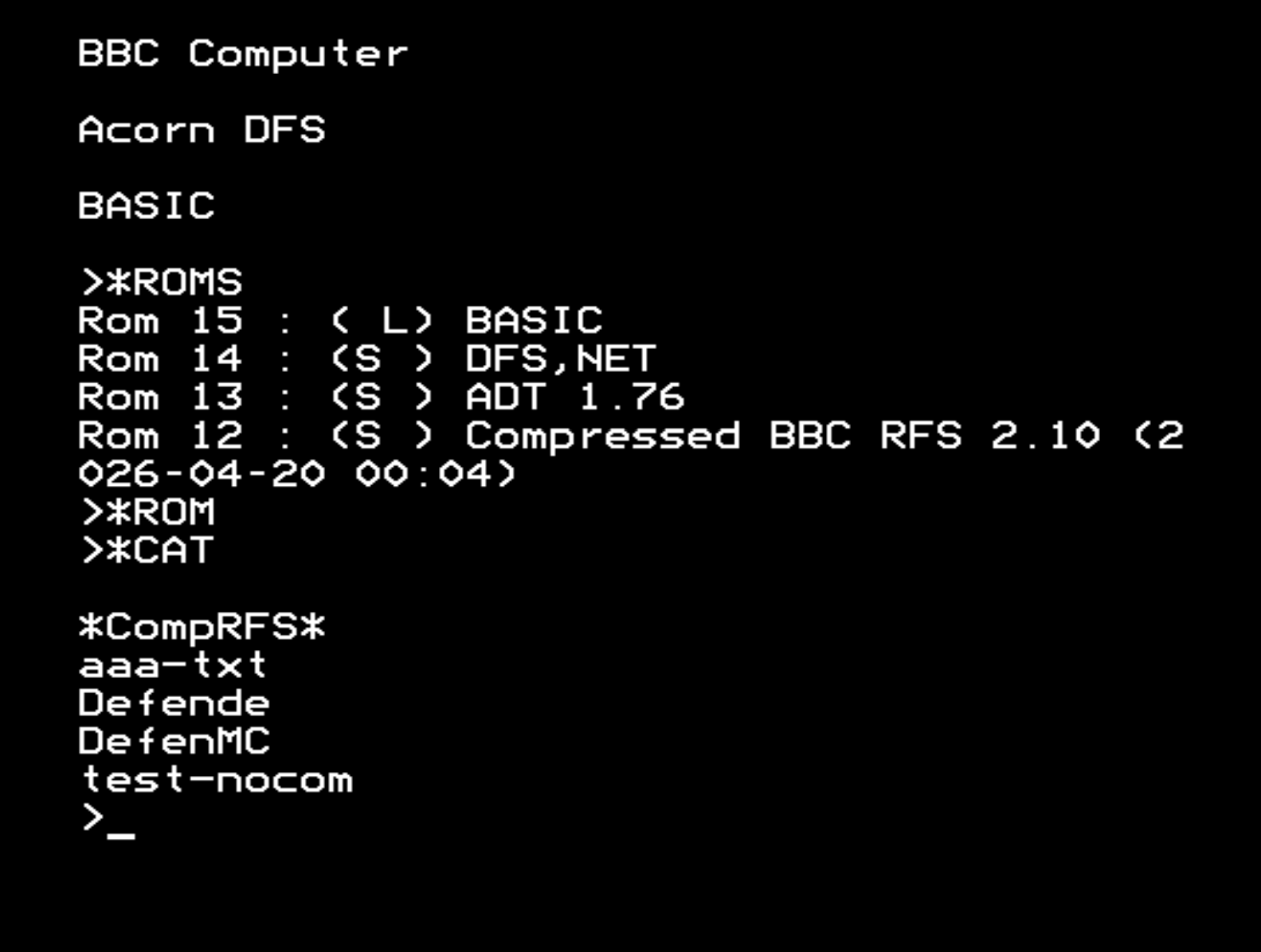
The Compressed ROM Filing System format, created by Greg Cook, stores files in a standard BBC Micro 16 KB sideways ROM using a compressed stream that begins after a conventional Acorn ROM header at &8000 and a small 6502 decompressor stub at &8040. The stream uses four compression mechanisms: a digraph table of up to 31 frequent two-byte pairs each encoded as a single byte token, a dictionary of up to 128 longer repeated sequences each referenced by a two-byte address token, run-length encoding for repeated byte values, and literal escape sequences for bytes that cannot otherwise be represented. Dictionary entries may chain up to nine levels deep, and since the ROM Filing System requires each file header to be directly addressable, each file’s stream is generated separately and chained to the next via a link field. The result is a self-delimiting compressed stream that the decompressor stub decodes on the fly in response to standard MOS ROM Filing System service calls, requiring no RAM workspace beyond a handful of zero-page locations.
BeebRFSMaker implements the full comprom.pl v2.10 compression algorithm:
The compressor analyses all the files together to build a shared dictionary, so common patterns across multiple files all benefit from the same tokens.
A standard, uncompressed RFS ROM is simpler: after the Acorn ROM header comes a short service handler, and then the file blocks are stored verbatim — no dictionary, no digraph table and no decompressor stub. It holds far less in the same 16 KB, but the layout is plain to read and nothing has to be decoded at run time. Because such a ROM has no language of its own, the language entry point at &8000 is left unused.
The app can be installed from:
Requires Windows 10 (build 1809) or later, or Windows 11.
BeebRFSMaker handles both the Compressed ROM Filing System v2.10 format and standard, uncompressed RFS. ROM images produced by BeebRFSMaker can be used with:
When reading an uncompressed ROM, the unused language entry point at &8000 may be filled with either three
NOP instructions or three zero bytes; both conventions are recognised.
BeebRFSMaker is free software. The CompRFS format and original comprom.pl script are by Greg Cook.
← BeebRFSTool ← Back to KLO Software