BeebFileUtilities
The app can be installed from:

Requires Windows 10 (build 1809) or later, or Windows 11.
Command-line tools for viewing BBC Micro files and disk images
Windows Command Line Microsoft Store BBC Micro FreeI recently got round to repairing and re-capping the power supply in my BBC Micro Model B, which I bought 40 years ago. Of course I started grabbing various programs and data from it, transferring to my Windows PC as .dsd files, then using those with BeebEm, and I bought a copy of BBC BASIC for Windows so that I could play with that too. I wanted some command-line utilities to display the content of .dsd files, and decode BBC BASIC files along with "PRINT#"-type BBC data files, so I wrote them as console commands. The utilities are:
--tokenize turn a plain text listing back into a program a BBC Micro will run.PRINT# type data files as plaintext, HTML, or BBCode.*CAT-style output of .SSD, .DSD or .IMG disk images, with the ability to export files individually, import files back in, delete files, and dump sectors.The most up to date version of this information will always be the online version.
This utility displays a tokenized, binary BBC Micro BASIC file as text, HTML, or BBCode for bulletin board posts. If there is "hidden data" after the BASIC program, that will be displayed in hex, as will control characters.
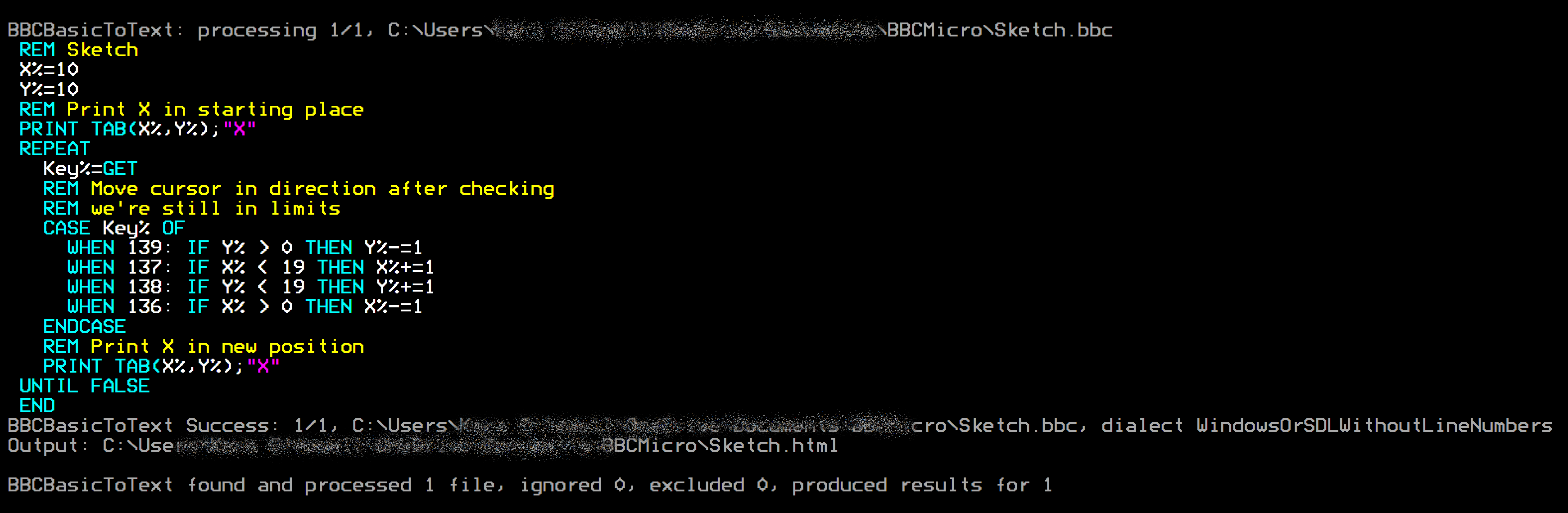
Here's an example of HTML output using the Sketch program from bbcbasic.co.uk as input, saved on the PC in BBC BASIC tokenised binary as Sketch.bbc:
C:\...\WelcomeDiskFiles> bbcbasictotext Sketch.bbc Sketch.html
BBCBasicToText found 1 file matching Sketch.bbc
Escape non-printable characters: True

BBCBasicToText: processing 1/1, C:\Users\...\BBCMicro\Sketch.bbc

BBCBasicToText Success: 1/1, C:\Users\...\BBCMicro\Sketch.bbc, dialect WindowsOrSDLWithoutLineNumbers

Output: C:\Users\...\BBCMicro\Sketch.html

BBCBasicToText found and processed 1 file, ignored 0, excluded 0, produced results for 1
 X%=10
 Y%=10
 REM Print X in starting place
 PRINT TAB(X%,Y%);"X"
 REPEAT
   Key%=GET
   REM Move cursor in direction after checking
   REM we're still in limits
   CASE Key% OF
     WHEN 139: IF Y% > 0 THEN Y%-=1
     WHEN 137: IF X% < 19 THEN X%+=1
     WHEN 138: IF Y% < 19 THEN Y%+=1
     WHEN 136: IF X% > 0 THEN X%-=1
   ENDCASE
   REM Print X in new position
   PRINT TAB(X%,Y%);"X"
 UNTIL FALSE
 END
It tries to detect the indentation style automatically based on whether the file is an Acorn format BASIC file or
BBC BASIC for Windows/SDL, but you can override this with the /w or --windows-style-indent
switches. Indentation is applied to FOR, REPEAT,
WHILE, and CASE, and it respects
EXIT REPEAT etc. You can turn indentation off entirely with --noindent.
I extracted the program from the Welcome disk using:
C:\...\WelcomeDiskFiles> bbcreaddiskimage Welcome.ssd --export=*.*welcome*
The leading *. there says "in any directory" — this particular file lives in directory
W, and a pattern without a directory looks only in $, just as it would on the Beeb itself.
then converted it to BBCode using:
C:\...\WelcomeDiskFiles> bbcbasictotext 0_W.WELCOME *.bbcode /w
BBCBasicToText found 1 file matching 0_W.WELCOME
Escape non-printable characters: True

BBCBasicToText: processing 1/1, C:\...\WelcomeDiskFiles\0_W.WELCOME
BBCBasicToText Success: 1/1, C:\...\WelcomeDiskFiles\0_W.WELCOME
Output: C:\...\WelcomeDiskFiles\0_W.WELCOME.bbcode
This produced:
  10 REM New version of 'INTRO' from
  20 REM Welcome pack
  30 REM By John Coll & Andrew Gordon
  40 ON ERROR GOTO 630
  50 ENVELOPE 1,1,-RND(50),-RND(50),-RND(45),255,255,255,127,0,0,-127,127,0
  60 SOUND 1,1,255,255
  70 DIM COM%11
  80 M0=650:M1=500:M2=708:M3=104:M4=288:M5=550:M6=720:M7=450:M8=5
  90 MODE5
 100 VDU5
 110 VDU23,255,255,255,255,255,255,255,255,255
 120 GCOL0,135
 130 CLG
 140 VDU18,0,129,24,128;128;1152;896;16,18,0,135,24,256;256;1024;768;16,26
 150 FORI%=M1 TO M2 STEP M3:PROCSWOOSH(M0):PROCLETTER:NEXT
 160 $COM%="DISC SYSTEM"
[Snip rest of "Welcome" BASIC program]
--tokenizeThe same tool converts back. --tokenize reads a plain text listing and writes a tokenised
program that a BBC Micro will run, together with the matching .INF file, so a program can be
listed out, edited in any text editor, and put back on a disk image:
BBCBasicToText MyProg.bas MyProg.bbc --tokenize
BBCReadDiskImage --import=MyProg.bbc MyDisc.ssd
The program is written as a .bbc file so that it is obvious on the PC what it is, while the
name recorded inside the .INF leaves that off — --import takes the name from
the .INF in preference to the host file name, so it arrives on the BBC as simply
MyProg.
A listing and the program it came from are meant to be interchangeable, and they are — with one thing to
know. The listing is indented by two characters per level of FOR, REPEAT,
WHILE or CASE, which is what makes it readable, but those spaces are then part of the
text. Tokenise that and the program carries them, list it again and it is indented on top of its own indentation,
a little further out each time round. --noindent is the answer: leave the indenting off and the text
is what the program actually holds, so it goes back byte for byte identical.
C:\Beeb\Basic> bbcbasictotext MyProg.bbc MyProg.txt --noindent
C:\Beeb\Basic> bbcbasictotext MyProg.txt MyProg.bbc --tokenize
--noindent means the same thing in both directions, which is the other way to keep a program from
growing. Listing without it adds no indentation; tokenizing without it takes the indentation off again, so a
listing that was indented to be read does not carry those spaces back into the program. That matters when you want
the listing indented — you are editing it, after all — and still want the program to stay the size it
was:
C:\Beeb\Basic> bbcbasictotext MyProg.bbc MyProg.bbcbas
C:\Beeb\Basic> bbcbasictotext MyProg.bbcbas --tokenize --noindent
Without it on the second command a program round-tripped over and over grows by its own indentation every time. With it, the program is the same size on the tenth trip as it was on the first.
The other half of that is what does not go into the file. The running commentary — which file is being processed, how it went, where the output landed, the count at the end — goes to the console only, so what you are left with is the listing and nothing but the listing. Redirect the output somewhere and you still see the progress on screen, because it was never part of the file to begin with.
That is peculiar to BBCBasicToText, and only because a listing has to be readable back in. BBCDataFileToText and BBCReadDiskImage put those lines in their output files as they always have: a data file listing and a disk image report are there to be read by a person, never fed back to anything, and in a file covering several of them the progress lines are what says where one ends and the next begins.
Give a wildcard as the destination and each input file gets its own output, named after it. The extension you
type is the one you get, so *.bbcbas means the same names, called .bbcbas —
handy if you have taught your editor to open that.
C:\Beeb\Basic> bbcbasictotext *.bbc *.bbcbas
Name a single file instead and every listing goes into that one file, one after another —
*.bbc all.htm gives you the whole folder on one page. Each listing is headed with its file name as a
REM, after a blank line, so it is clear where one program ends and the next begins:
REM A.bbc
   10 REM First program
   20 PRINT "A"
   30 END

REM B.bbc
   10 REM Second program
   20 FOR I%=1 TO 3
   30     PRINT I%
   40 NEXT I%
Only one program going into one file is left exactly as it always was, with no heading, so nothing that
round-trips through --tokenize is disturbed.
Only the extension the input specification named is taken off, which matters for files exported from a disk
image. 0_$.MYPROG has no extension at all — .MYPROG is the BBC name — so a
run over *.* keeps the whole name and simply adds to it, rather than collapsing every file in a
directory onto 0_$. And should a wildcard ask for a file to be its own output, as
*.bbc *.bbcbas would if you typed *.bbc twice, it says so and writes elsewhere instead
of destroying what it is reading.
Both tools take wildcards, so a directory of plain text listings becomes a disk image ready for an emulator or a real machine in two commands:
C:\Beeb\Basic> bbcbasictotext *.bas --tokenize
C:\Beeb\Basic> bbcreaddiskimage BasicTest.ssd --import=*.bbc
The first writes a .bbc and a .INF beside each listing. The second creates the
image — it does not have to exist already — and imports them all, each taking its BBC name from
its .INF. Answering A at the first overwrite prompt settles the rest of the run.
Lines keep the numbers they have; a listing with none is numbered in tens. A listing that wraps one BASIC
line over several indented text lines, each part ending with the : that separates statements, is
folded back into the single line it came from.
--load= and --exec= set the addresses written to the .INF, and
--append= places binary data after the end of the program — optionally at a fixed address,
as --append=title@&5C00. That is how a game kept a title screen or its graphics in the same
file as the BASIC that displayed them.
--crunchA Model B does not leave much room once the screen has taken its share, so --crunch makes a
tokenised program smaller without altering what it does. On its own it removes only the spaces that make a
listing easier to read, which is always safe; --crunch=all also drops REM lines and
joins lines together, or name what you want with --crunch=spaces,rems,lines.
BBCBasicToText Yahtzee.bbc Yahtzee_small.bbc --crunch=allIt knows when it must not. A program carrying data after the end of the BASIC, or hiding machine code in a
REM, is refused outright and left alone: both are reached by absolute address, so shortening any
line anywhere would move them. Joining lines is declined wherever it would change the meaning — after an
IF, whose THEN governs the rest of the line; onto a line whose * command
swallows what follows; before a DATA line, which READ only finds at the start of a
line; and to any line that a GOTO or GOSUB refers to by number.
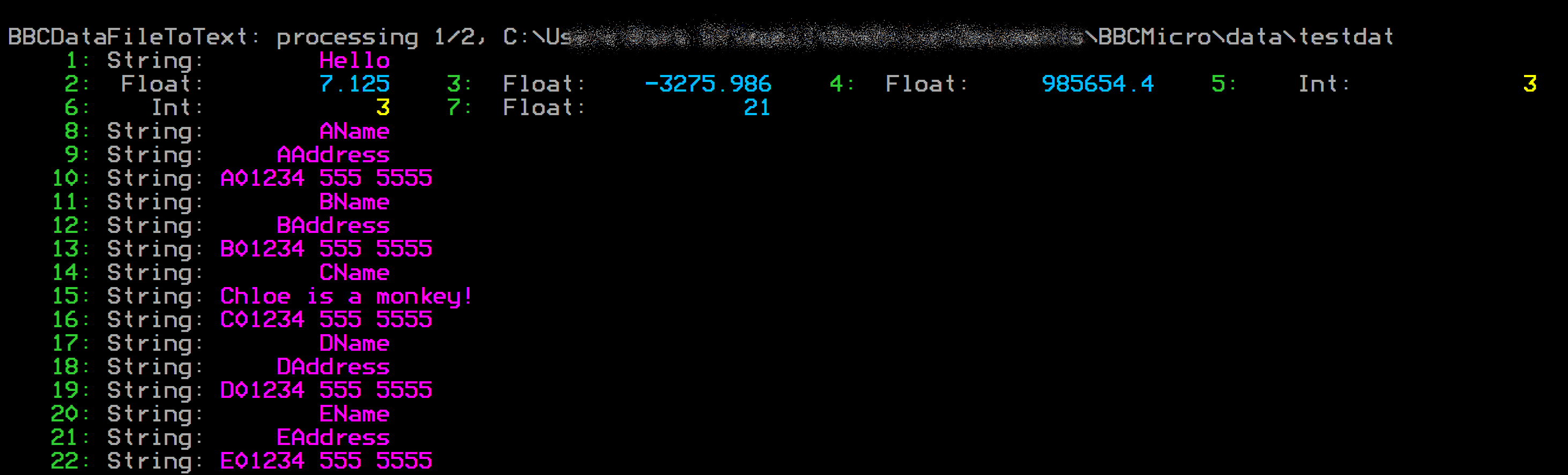
Show BBC PRINT#-type data files as text, HTML, or BBCode, with hex and ASCII dump options.
This can actually be used as a "hex dump" program for any PC file. I have
defined in my command terminals for that reason.
> hex binaryfile.bin binaryfile.bbcode
BBCDataFileToText: processing 1/1, C:\Users\...\binaryfile.bin
000000 89 50 4E 47 0D 0A 1A 0A 00 00 00 0D 49 48 44 52 00 00 09 1F 00 00 07 3F 08 06 00 00 00 A6 E8 13
000020 04 00 00 00 01 73 52 47 42 00 AE CE 1C E9 00 00 00 04 67 41 4D 41 00 00 B1 8F 0B FC 61 05 00 00
000040 00 09 70 48 59 73 00 00 24 E8 00 00 24 E8 01 82 63 05 1C 00 00 FF A5 49 44 41 54 78 5E EC FD 0B
...
052040 48 E4 23 00 00 00 00 00 00 00 00 20 91 8F 00 00 00 00 00 00 00 00 80 60 3B 5C 38 F0 C2 B6 D2 6F
052060 73 00 00 00 00 49 45 4E 44 AE 42 60 82
BBCDataFileToText Informational: 1/1, binaryfile.bin is not BBC BASIC PRINT# data file.
Output: C:\Users\...\binaryfile.bbcode
BBCDataFileToText found and processed 1 file, ignored 0, excluded 0, produced results for 1
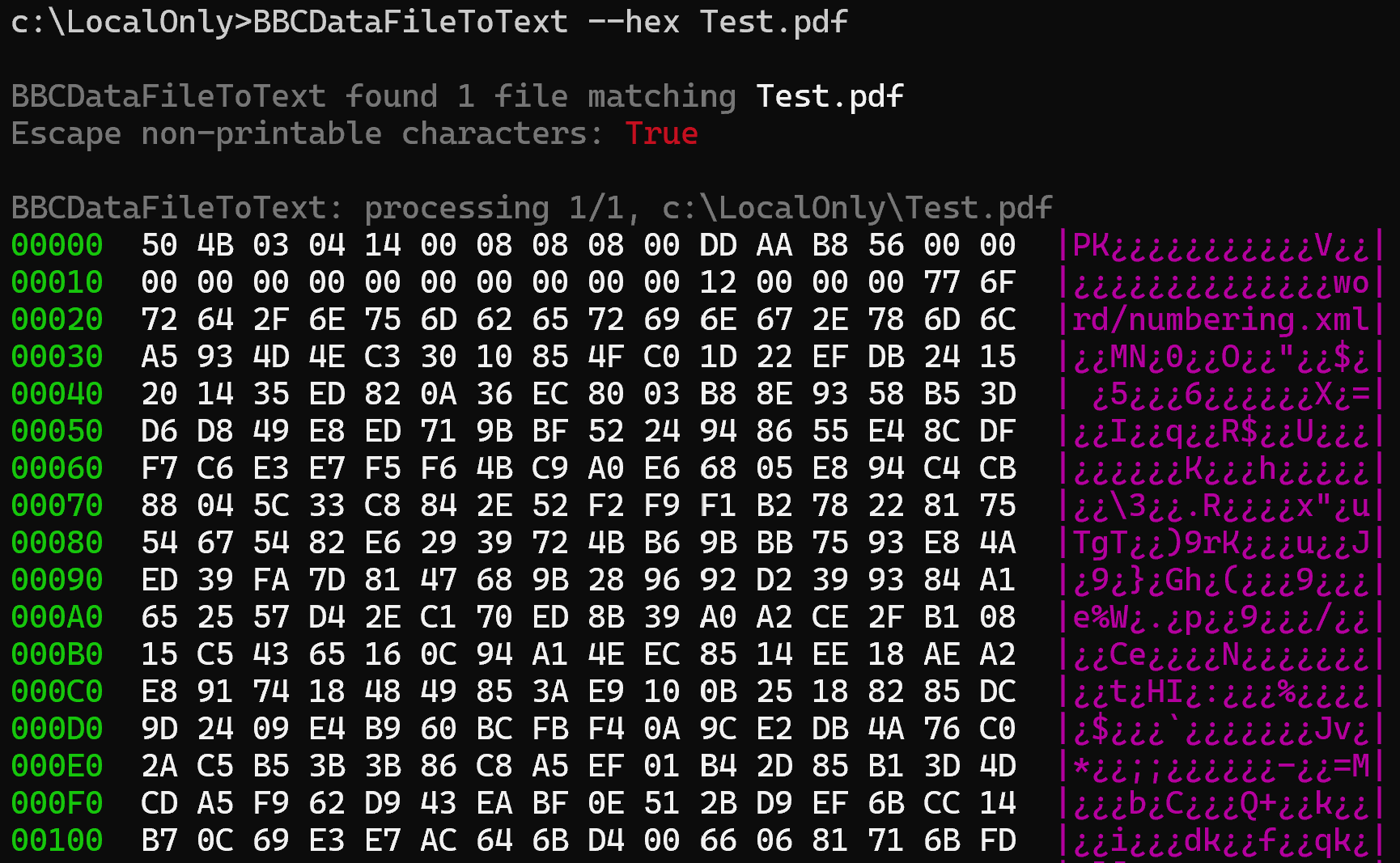
The BBCDataFileToText utility makes a handy, general-purpose "hex dump" program. For example, if you enter
BBCDataFileToText --hex Test.pdf*
you will see output similar to that shown below
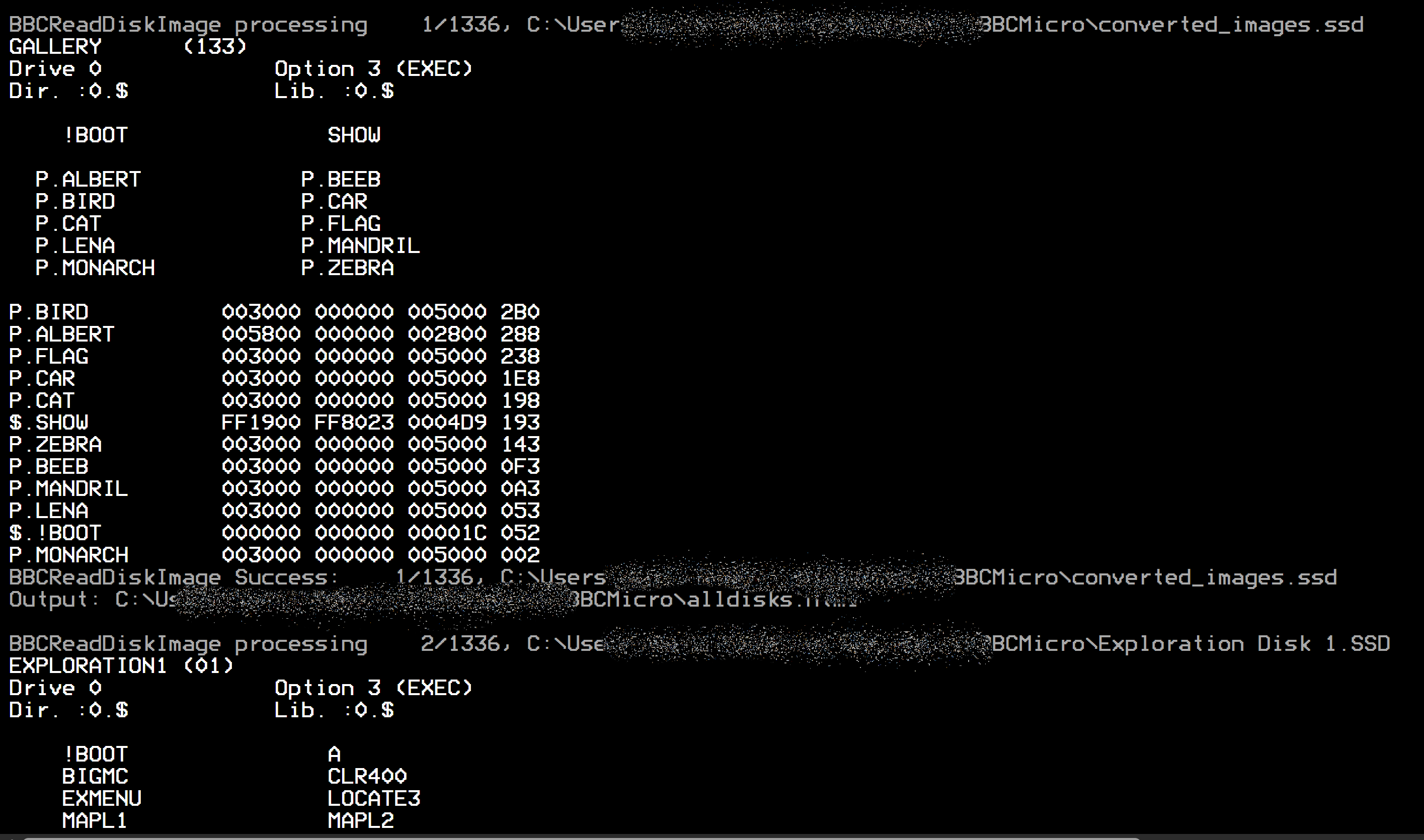
Display *CAT-style output of .SSD, .DSD or .IMG disk images, with
the ability to export files individually, import files back into an image, delete files from one, and dump raw
sectors.
.IMGA .SSD is single-sided and a .DSD double-sided, as their names say, and those are taken at
their word. A .IMG — the extension BeebEm and several other tools use — says nothing either
way, so the image itself is asked instead.
The catalogue records how many sectors there are on one side of the disk, and multiplying that by the 256-byte sector size gives the length a single-sided image of that disk would have. Anything longer must hold a second side. A 200 KB image whose catalogue reports 800 sectors is therefore an 80-track single-sided disk, where a 200 KB image reporting 400 sectors is a 40-track disk with two sides. The length on its own cannot tell those apart, which is why the catalogue has to be consulted. The run reports which it settled on and what decided it.
An image that holds no catalogue at all is named and skipped rather than listed as nonsense, and the reason is given — a disk that has been formatted but never written to holds nothing but filler bytes, while an image in some other format, such as an ADFS or DOS disk from a Master 512, has its own idea of what belongs at the start of a disk. Neither is something this tool can read.
The patterns given to --export, --search and --delete are written the way a
file specification is written on the BBC itself, and they cover the whole name. A pattern that does not say
which directory it means looks in the default directory $ — or in whatever --directory
names, since that is what stands in for *DIR here.
| Pattern | Means |
|---|---|
MYPROG* | a name starting with MYPROG, in $ |
*PROG* | a name with PROG anywhere in it, in $ |
* | every file in $ |
*.* | every file on the disk, in every directory |
P.O* | a name starting with O, in directory P |
*.O* | a name starting with O, in any directory |
Name a folder as the destination and the exported files are written there, with the report of the run going
to the console. A name ending in \ is taken as a folder even if it is not there yet, and is created.
Name a file instead and the report goes into it, with the exported files written alongside — so
.\Output\ExtractedFiles.log gives you both in Output.
C:\...\MakeRFS> bbcreaddiskimage MakeRFSROM.dsd --export=*.RFSRom .\Output\
Don't like the 0_$. prefix? Help is at hand: --undecorated leaves off the drive and
directory and writes each file under its BBC name alone, so :0.$.MYPROG arrives as plain
MYPROG. Nothing is thrown away in the process — the .INF file beside it still records
where the file came from, so --import knows to put it back into $ on side 0.
It still protects you from PC name clashes, too. A disk is perfectly entitled to hold both $.PROG and
R.PROG, and with the directories gone both of them would like to be called PROG. Rather than
let the second quietly flatten the first, the overwrite prompt offers a Rename answer, which parks the newcomer
beside its namesake as PROG_1 and leaves the original exactly where it was. The .INF file
still says R.PROG, so the trip back onto a disk image is none the wiser.
C:\...\WelcomeDiskFiles> bbcreaddiskimage Welcome.ssd --export=*.* --undecorated .\Output\
A BBC file has no extension in the sense this filing system means, which leaves Windows with no idea what to do
when you double-click one. --extension settles that: name the extension you want and every exported file
gets it, so --extension=.bbcbas hands them all to whatever you have .bbcbas registered
against. The dot is optional, and it goes equally well with either naming style —
0_$.MYPROG.bbcbas on its own, or MYPROG.bbcbas alongside --undecorated. The
.INF file is named after the whole thing, so the pair stay together, and a name that has to be renamed
around a clash keeps its extension on the end, as MYPROG_1.bbcbas.
One file is deliberately left out of it. !BOOT is not a program at all — it is the plain text a
disk set to *OPT 4,3 hands to *EXEC when you press shift-BREAK — so handing it to
whatever you have .bbcbas registered against would be exactly the wrong thing to do. It is exported
under its own name, and the run tells you as much rather than leaving you to notice:
Exporting !BOOT without .bbcbas - it is the plain text shift-BREAK runs, not a program
C:\...\WelcomeDiskFiles> bbcreaddiskimage Welcome.ssd --export=*.* --undecorated --extension=.bbcbas .\Output\
The same option earns its keep on the way back in, where it says which extension to take off before the BBC name
is read out of a host file name. That matters more than it sounds, because of one genuinely ambiguous shape: is
A.bbcbas the file bbcbas in directory A, or the file A with an
extension on it? Nothing in the name can tell you — R.PROG looks exactly the same — so the
tool asks, showing both readings and where each would land:
A.bbcbas could be the file bbcbas in directory A, or the file A with the host extension .bbcbas.
Taken as it stands it would be imported as :0.A.bbcbas, and as an extension it would be :0.$.A
Is .bbcbas a host extension to leave off? (Yes/No/All)
Saying nothing keeps the directory.name reading the convention has always used, and that is also
what --force and any run without a keyboard do, so nothing you have scripted changes its mind.
All takes every later name of that shape as carrying an extension. Give --extension on the import
and the question does not come up at all, which is the tidy way to bring back a folder you exported with it. A file
with a matching .INF is never in doubt either, since the sidecar names the directory outright —
which is why an ordinary round trip through this tool never sees the question.
The reverse of exporting. The image named is created first if it does not exist — give the name in
full, ending .ssd or .dsd, and you get an empty 80-track image titled after the file name.
Each side is compacted as it is written, so space left by deleted files is reclaimed.
C:\...\MakeRFS> bbcreaddiskimage NEWDISK.ssd --import=0_$.MYPROG,C:\Beeb\Screens\*
The import specification takes wildcards too, so a folder of programs goes onto a new disk in one
command. Here eleven .bbc files — the output of bbcbasictotext *.bas --tokenize
— are imported into an image that did not exist until this command created it, each taking its BBC name
from its .INF:
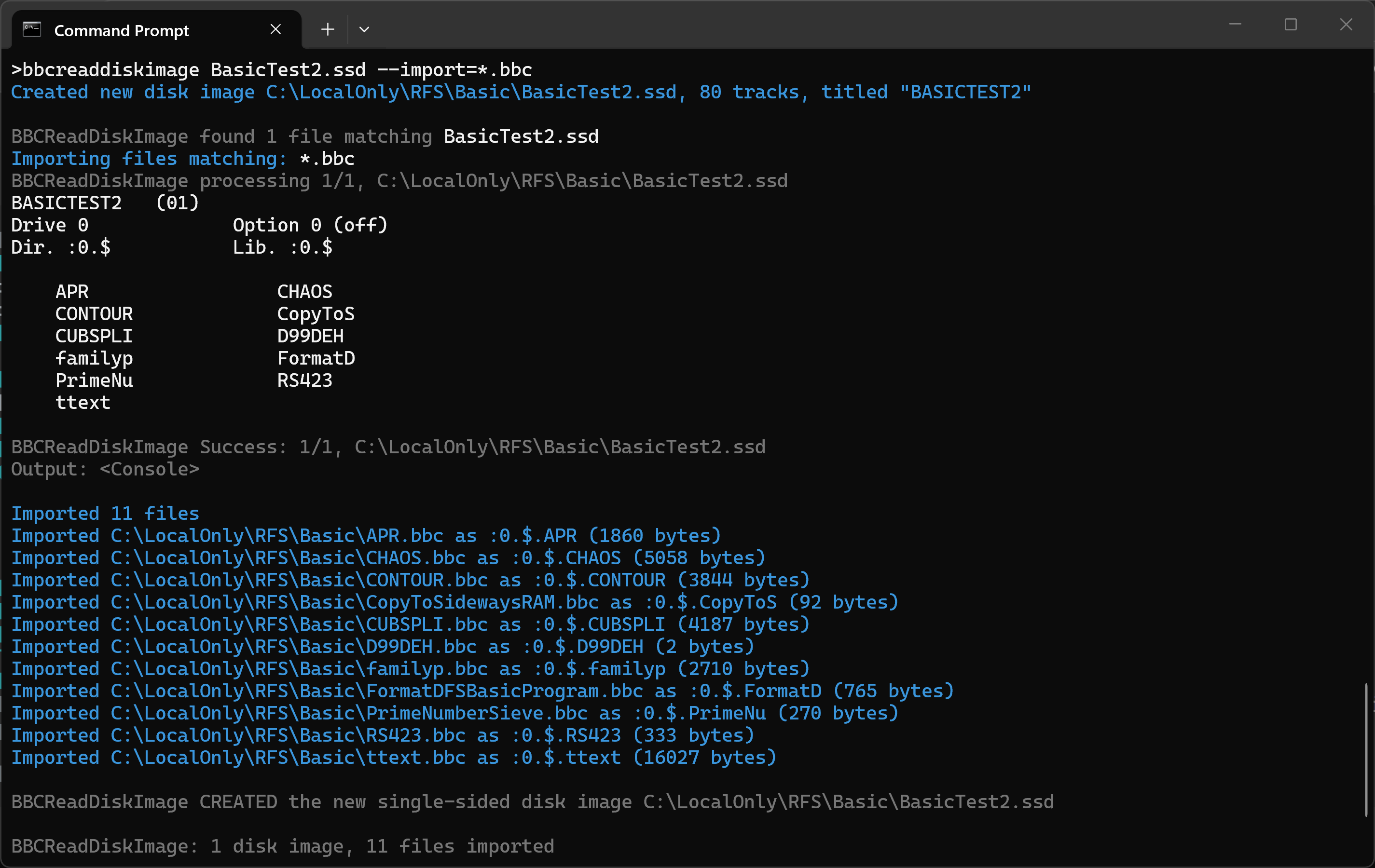
Note that the names are shortened to the seven characters DFS allows, so
CopyToSidewaysRAM.bbc becomes CopyToS and PrimeNumberSieve.bbc becomes
PrimeNu. Give a file the BBC name you want in its .INF if the shortened form would
be ambiguous.
Each file's BBC name, directory and side are worked out from, in increasing order of precedence: the default of
$ on side 0; the host file name in the 0_$.NAME form that --export writes
(drive 0 is side 0, drive 2 is side 1); a matching .INF file, which also supplies the load and execution
addresses and the lock flag; and finally --directory and --side. Names are shortened to the
seven characters DFS allows. A name shaped like the convention but starting with something that is not a drive —
1_T.RFSROM when 2_T.RFSROM was meant — is queried rather than quietly imported under an
odd name.
--import may be given more than once and the lists are combined, so
--import=*.bbc --import=SCREENS\* takes both, exactly as naming them in one option separated by
commas always did. Where two specifications name the same file — overlapping wildcards, or a wildcard and
the file itself — it is imported once.
A plain text BASIC listing is tokenized on the way in. Text is no use to a BBC Micro — imported as
it stands it would sit on the disk as a file that cannot be CHAINed — so a listing edited on the
PC goes back onto a disk in one command rather than two:
C:\Beeb\Basic> bbcreaddiskimage GamesDisk.ssd --import=BatAndBall.bbcbas
It is given the BASIC load and execution addresses, &FF1900 and &FF8023, unless a
matching .INF says otherwise — the sidecar always has the last word. With a wildcard a whole
folder of edited listings goes on at once.
Only a listing is treated this way, and the test is deliberately narrow, since guessing wrong would quietly
rewrite a file. A program that is already tokenized goes in untouched, so does a PRINT#
data file, so does anything holding the control bytes that text does not, and so does text with no line
numbers — which is what leaves a !BOOT alone, that being the text the machine reads at
SHIFT-BREAK rather than a program.
A !BOOT file whose .INF records a boot option, as OPT4=3 or
BOOT=3, sets that option on the disk just as *OPT 4,3 would. That is what lets a disk
which starts itself on SHIFT-BREAK be built entirely from ordinary files on the PC. A side with no
!BOOT keeps whatever option it already had.
The .INF files themselves are read and written to the full published format: the
CRC=, NEXT, OPT4=, BOOT=, ATTR=,
TYPE= and TAPE fields are all understood, and any field the tools do not recognise is
kept and written back out rather than quietly dropped, so nothing another tool recorded is lost.
Takes the same patterns as --export, and compacts the side afterwards so the space comes back. Each
file is confirmed before it goes, unless --force is given, and a locked file is only deleted when
it is. There is no undo, so work on a copy if you are in any doubt.
C:\...\MakeRFS> bbcreaddiskimage MakeRFSROM.dsd --delete=OLDPROG,P.M*
Delete :0.P.MTWO (300 bytes) from MakeRFSROM.dsd?
This cannot be undone. Delete it? (Yes/No/All) :
All three can produce colour output — strings, keywords, and the like are each coloured differently — writing plain text (in colour when sent to a command-prompt window), BBCode, or HTML, and can optionally launch your browser for the HTML. They understand wildcards and dive recursively through your folders, so you can convert a whole shoebox of discs in one go. Four decades on, your Acorn archive has never looked this good!
--more, --head and --tailA long BASIC listing or a hex dump of a 16 KB ROM will scroll off the top of the window before you can read
any of it. All three utilities understand three options for taking the output a piece at a time. They apply to
whatever the tool would normally print — a de-tokenised BASIC listing, a PRINT# data file, a disk
catalogue, or a hex or ASCII dump.
--more — a screenful at a timeThis pauses after each screenful and waits for a keypress. Space shows the next page, Enter moves on
by a single line, A shows all the rest without pausing again, and Q or Escape stops there. The
prompt is written so that it disappears again once you have pressed a key, leaving the output clean when you scroll
back through it. You can also use the short form /m or -m.
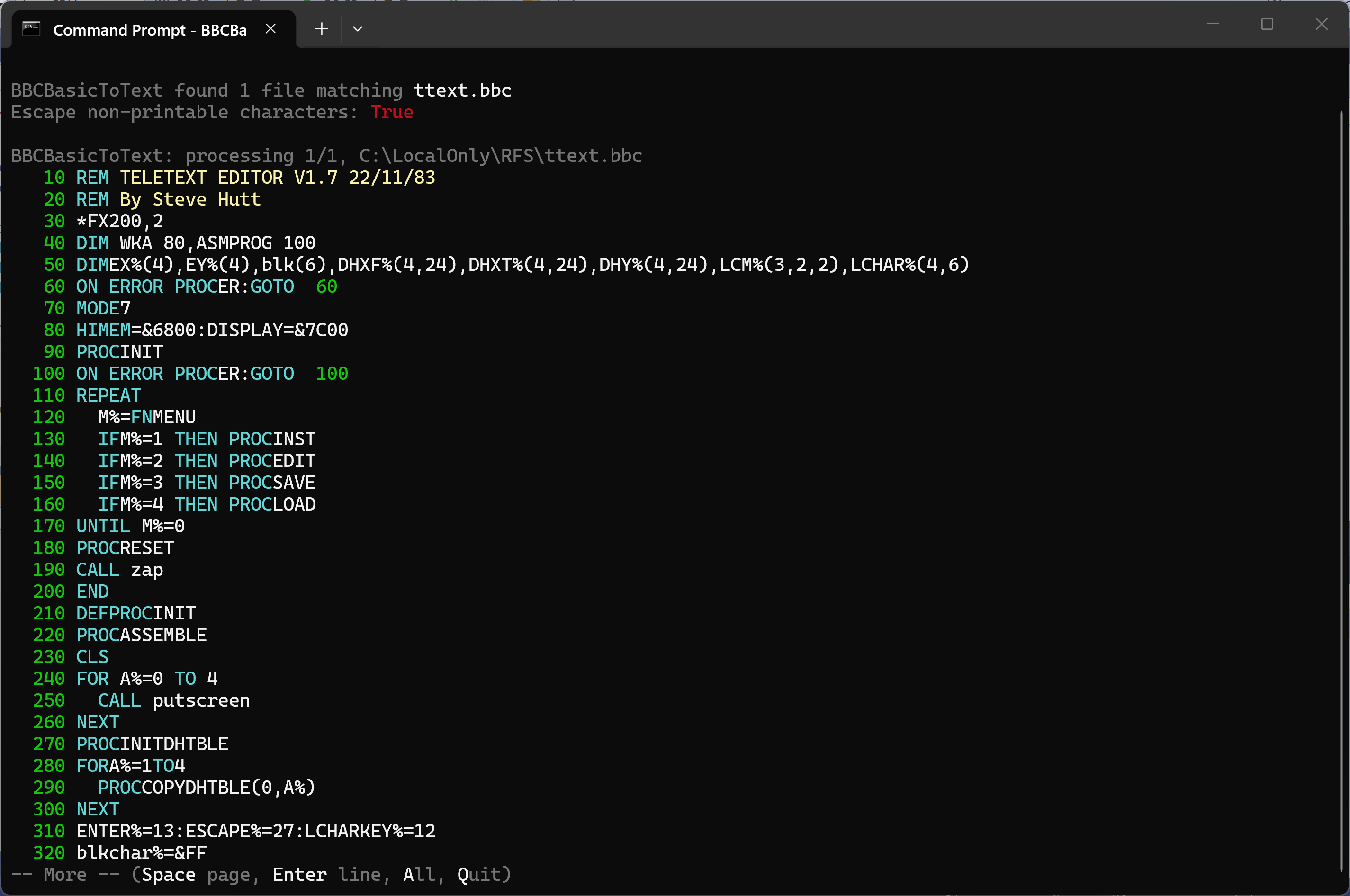
A BASIC listing paused at the end of the first screenful, with the -- More -- prompt
It counts the lines the screen actually shows rather than the lines in the file, so a long DATA statement that wraps onto three rows is counted as three. That matters most for a hex dump, where every line is the same width and a wrapped line would otherwise push a row off the top unnoticed:
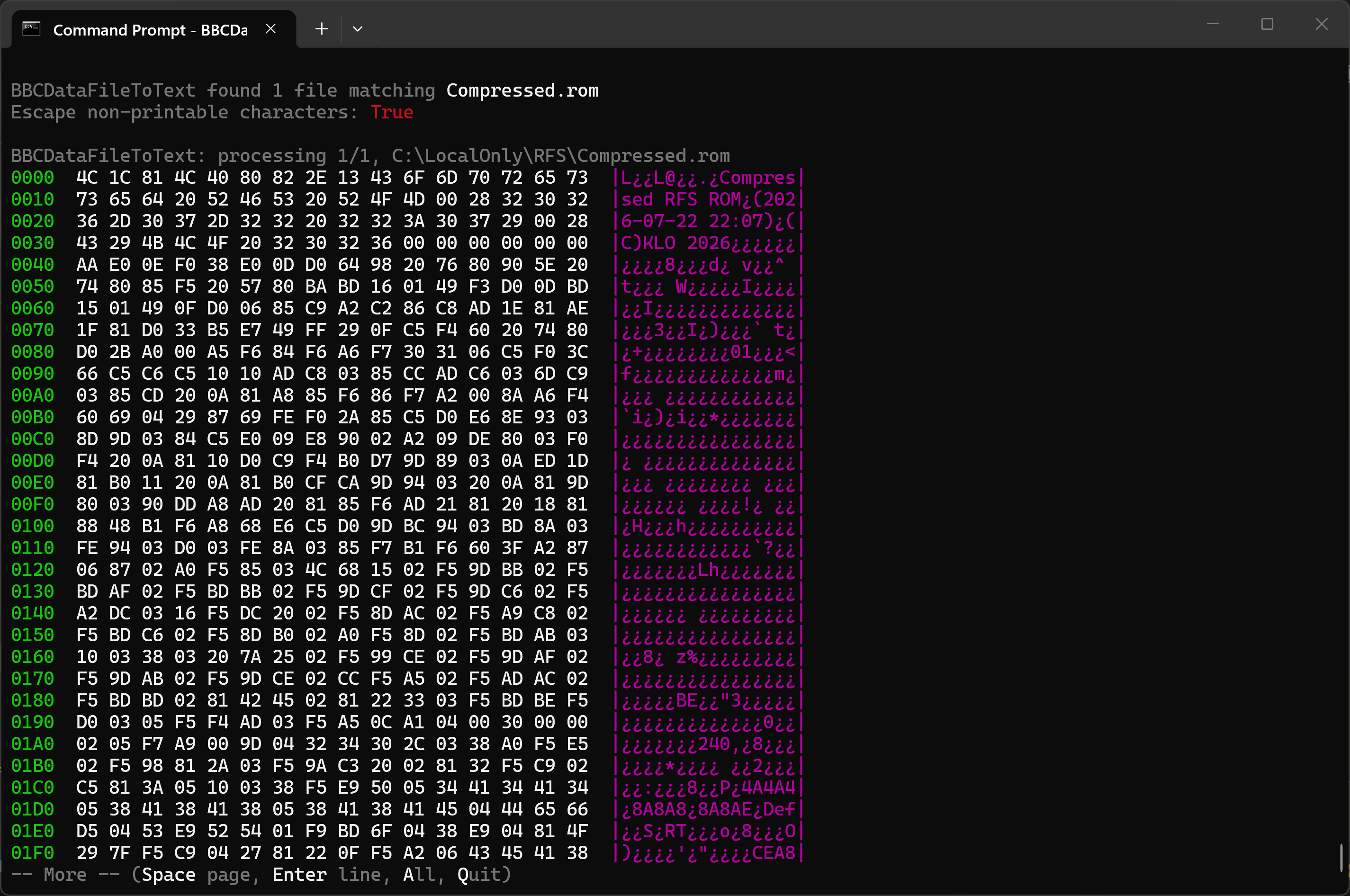
BBCDataFileToText dumping a ROM image in hex, paused at the end of the first screenful
If the output is redirected to a file or piped into another command there is nothing to page, so the option quietly does nothing. That makes it safe to leave in a DOSKEY macro permanently:
--head[=n] — just the beginningShows only the first n lines and stops, which is the quickest way to see what a file actually is. Without a number it shows 20 lines.
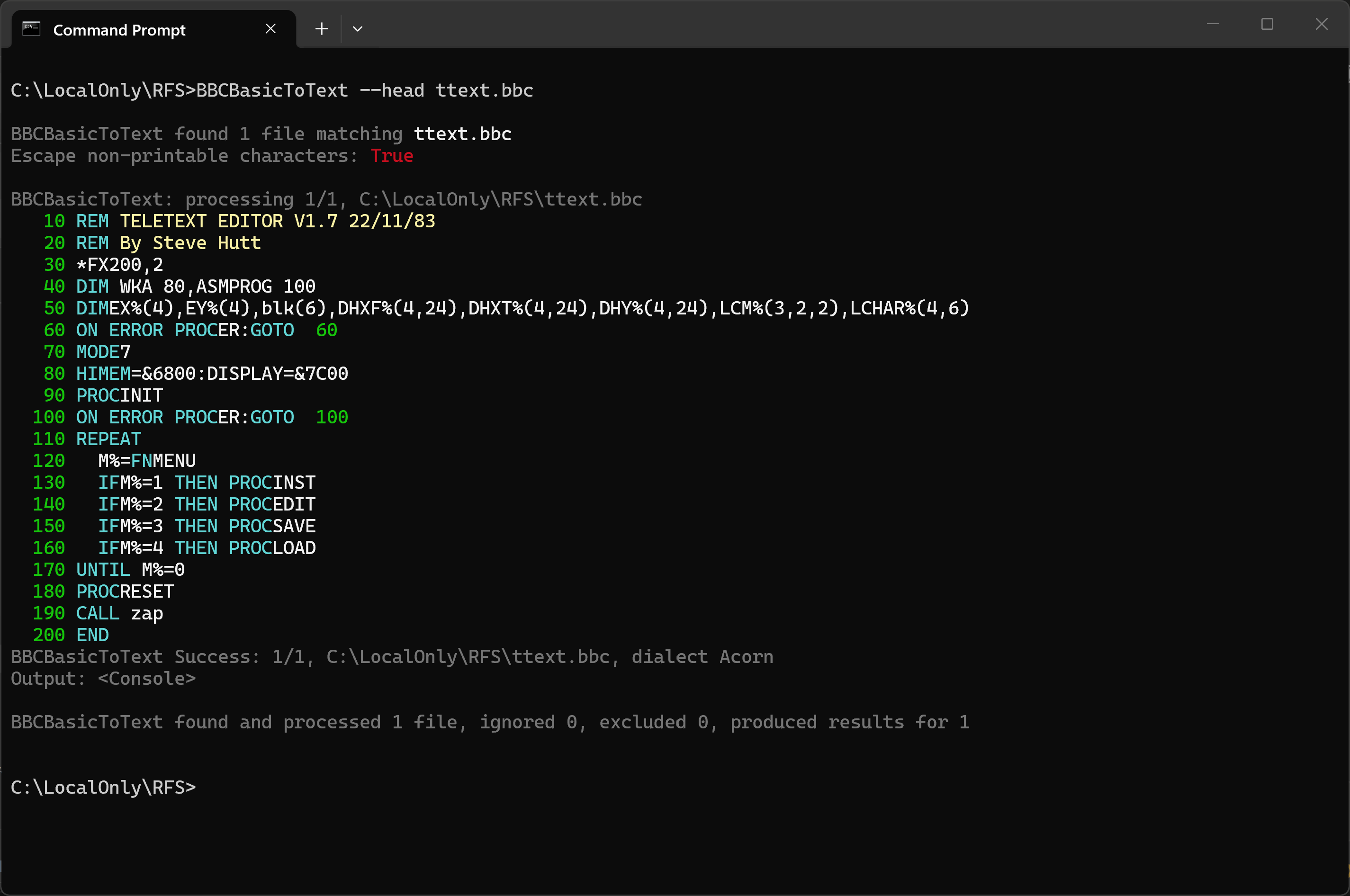
--head showing the first 20 lines of a teletext editor written in 1983
--tail[=n] — just the endShows only the last n lines, again 20 by default, and says how many lines it passed over to get there. For a
hex or ASCII dump it seeks straight to the end of the file rather than reading through the whole thing, so
--tail on a large file is quick no matter how big the file is.
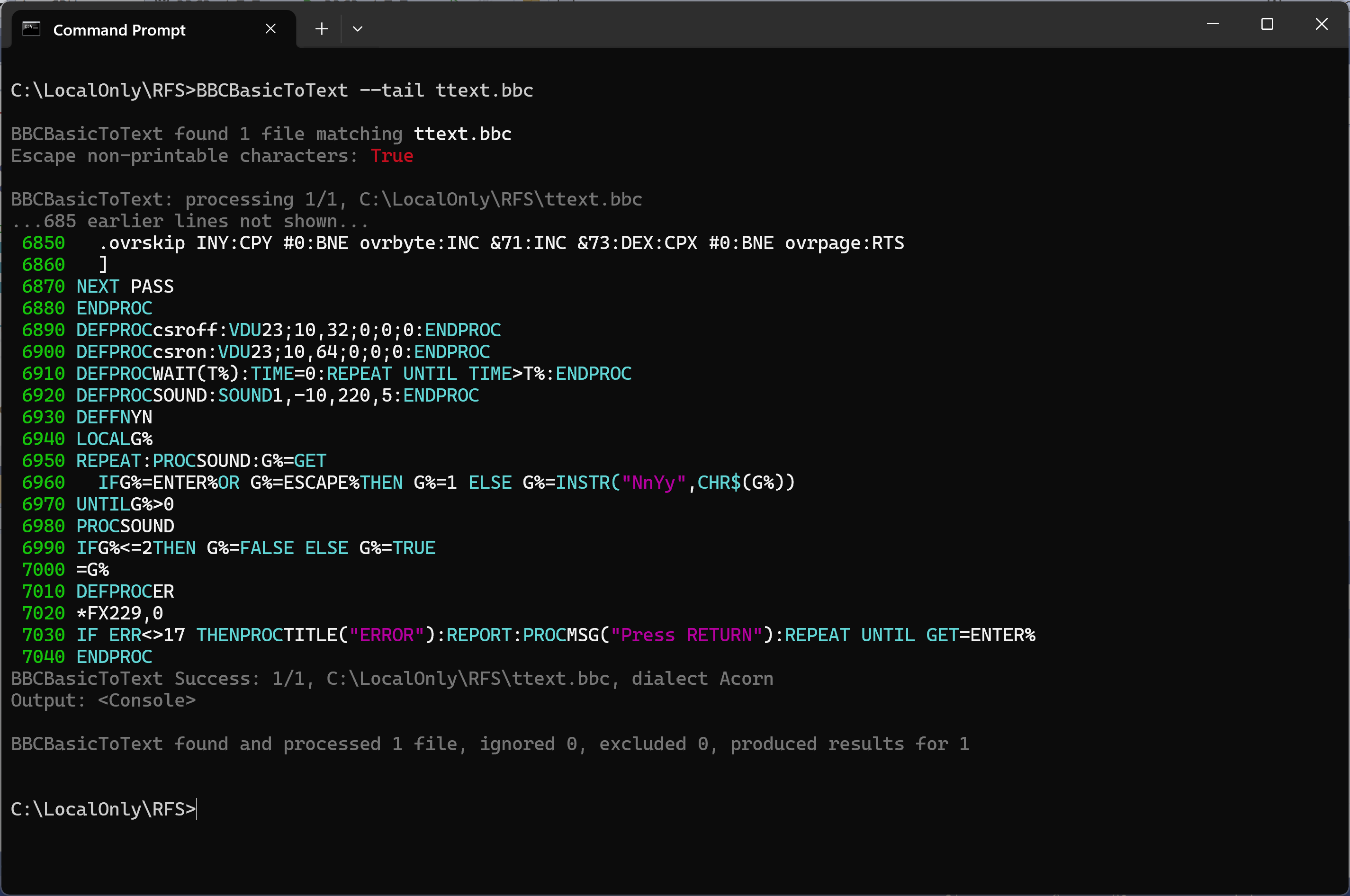
--tail showing the last 20 lines of the same program, having skipped the 685 before them
Both --head and --tail apply to what is shown on screen. If you give the tool an output
file, that file still receives everything.
.INF for a file you already haveA .INF sidecar records what a Windows file cannot: the BBC name, the load and execution
addresses, and the length. --tokenize writes one as it creates a .bbc, but a program
that arrived some other way — lifted off a disk image, downloaded, or copied from a real machine —
usually has none, and without it a tool importing the file has to guess. Naming a .inf
destination fills that gap. Both BBCBasicToText and BBCDataFileToText understand it, and it
means the same thing in each, so whichever tool the file is nearest to will do:
C:\LocalOnly\RFS> bbcbasictotext ARRAYLENSUM.bbc ARRAYLENSUM.bbc.INF
Writing .INF sidecar files only; no listing will be produced.
BBCBasicToText: C:\LocalOnly\RFS\ARRAYLENSUM.bbc is tokenized BBC BASIC
  C:\LocalOnly\RFS\ARRAYLENSUM.bbc.INF  $.ARRAYLE  00FF1900 00FF8023 000029
Nothing had to be said about what the file was. The tool works that out for itself, and the same command
recognises a data file written by PRINT# just as readily:
C:\LocalOnly\RFS> bbcdatafiletotext NAMES NAMES.INF
Writing .INF sidecar files only; no dump or decode will be produced.
BBCDataFileToText: C:\LocalOnly\RFS\NAMES is BBC data file
  C:\LocalOnly\RFS\NAMES.INF  $.NAMES    00FF0000 00FF0000 000012
The two differ only in the addresses, and for a reason. A BASIC program is given &FF1900,
which is PAGE under DFS, and &FF8023, the BASIC entry point, so that it will load
and run. A data file is never loaded or run — it is read back through the filing system — so it has
no meaningful address of its own and is given zero. The final field is the length in hex, which is the part
that is tiresome to work out by hand.
A file that is neither is reported and left alone. No .INF is written for it, deliberately: one
stating a length and a pair of addresses for something that is not a BBC file at all would be believed by the
next tool along, which is worse than having no .INF:
C:\LocalOnly\RFS> bbcbasictotext SCREEN.bin SCREEN.bin.INF
BBCBasicToText: C:\LocalOnly\RFS\SCREEN.bin is neither a tokenized BBC BASIC program nor a BBC data file - no .INF written
Wildcards work, and give one sidecar per input named after that input — MYPROG.bbc.INF
beside MYPROG.bbc, which is the same pairing --tokenize produces. A .INF
describes a single file, so they are never gathered into one:
C:\LocalOnly\RFS> bbcbasictotext *.bbc *.inf
Name one file outright instead and it is taken at its word, which is how to put the .INF
somewhere other than beside the program. Either way the result is ready for
BBCReadDiskImage --import, or for
BeebRFSTool to pack into a ROM, both of which take the BBC name and the addresses
from the sidecar in preference to anything they could infer from the Windows file.
All three utilities run from a Command Prompt or PowerShell. For example, from a Command Prompt:
BBCBasicToText    "%OneDrive%\Documents\BBCMicro\ARRAYLENSUM.bbc"
BBCDataFileToText "%OneDrive%\Documents\BBCMicro\NAMES"
BBCReadDiskImage  "%OneDrive%\Documents\BBCMicro\Games.dsd"
Each tool describes itself with --help. That is a reference list of every option, which is what you
want when you know the option exists and have forgotten how it is spelled. When you would rather see the thing
being used, add the word examples and half a dozen worked command lines follow the list, shown in
green so they stand out from the options above them:
C:\Beeb\Basic> bbcbasictotext --help examples
In PowerShell, use $env:OneDrive in place of %OneDrive%.
BBCReadDiskImage "$env:OneDrive\Documents\BBCMicro\Games.dsd"
Because typing the full command names is tedious, you can create DOSKEY macros in a command file named cmdsetup.cmd:
To run this automatically in every new command window, add the following to the registry by saving it in a file of type .reg and double-clicking it. Always be careful adding .reg files unless you trust their source and know what you are doing - it can be a security risk.
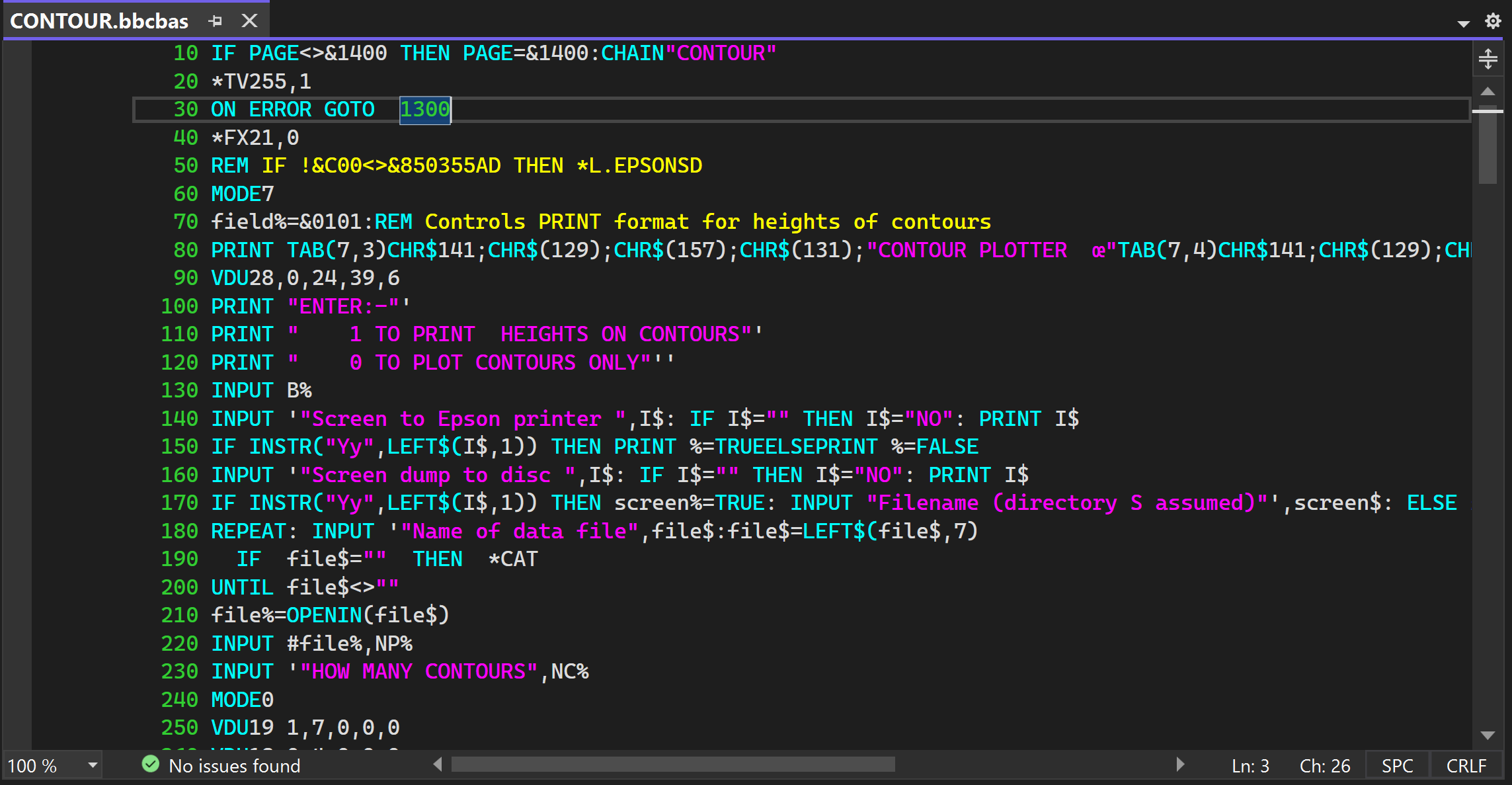
A listing taken off a disk image is only text, so any editor will open it, but none of them knows what BBC
BASIC is. BBCBASICforVisualStudio.zip is a TextMate grammar that teaches Visual Studio, and it colours a listing the
same way BBCBasicToText prints one: line numbers — and the line a GOTO refers to
— in green, keywords in cyan, strings in magenta, the text of a REM in yellow and of a
DATA statement in blue. Everything else is left alone, as the tool leaves it. If you would like
to used VS or VS Code to edit your BBC BASIC files then read on.
Download BBCBASICforVisualStudio.zip (5 KB). Visual Studio looks for a
grammar like this in a .vs folder in your user profile. If you do not already have one, create it
from a Command Prompt:
C:\> cd %USERPROFILE%
C:\Users\You> mkdir .vs
Then unpack BBCBASICforVisualStudio.zip into that .vs folder, so that you end up with:
%USERPROFILE%\
    .vs\
        Extensions\
            BBCBASIC\
                Syntaxes\
                    BBCBASIC.json
                    BBCBASIC.tmTheme
                    BBCBASIC_for_dark_theme.tmTheme
                    BBCBASIC_for_light_theme.tmTheme
Only BBCBASIC.tmTheme is ever read — Visual Studio finds a theme by the name of the
grammar sitting beside it. The other two are copies to pick from. As it comes it holds the colours for a
dark theme, which is what the screenshot above shows. If you use a light Visual Studio theme,
put the other one in its place:
C:\> cd %USERPROFILE%\.vs\Extensions\BBCBASIC\Syntaxes
...\Syntaxes> copy /y BBCBASIC_for_light_theme.tmTheme BBCBASIC.tmTheme
The light version keeps the same colours, taken from the darker end of the same sixteen the tools draw from, so that they can be read against a white page. Either way, restart Visual Studio afterwards: it reads that folder once, at startup, so nothing changes until you do.
Use .bbcbas. That is the extension to prefer, and .bbcbasic and
.beeb work as well. Do not use .bas: Visual Studio gives that extension to
Visual Basic, along with .cls, .frm and the rest of the VB6 family, and a language
service always takes precedence over a grammar like this one. A listing named .bas will simply
not be coloured.
To produce one, give BBCBasicToText the name you want:
C:\Beeb\Basic> bbcbasictotext CONTOUR.bbc CONTOUR.bbcbas
Edit it in Visual Studio, then write it back with --tokenize, which produces
CONTOUR.bbc and its .INF ready to import into a disk image:
C:\Beeb\Basic> bbcbasictotext CONTOUR.bbcbas --tokenize
Add --noindent to the first command if you want to go out and back without the program
changing at all. The listing is auto-indented by default, which makes it easier to read but adds real spaces
to the program when it is tokenised again; without it, the file that comes back is identical to the one you
started with, byte for byte.
The same colouring works in Visual Studio Code, from the same grammar — a TextMate grammar is
a TextMate grammar. What differs is how each editor is told about it. Visual Studio finds one by where the
file sits; Visual Studio Code has no such convention, so the grammar has to introduce itself in a
package.json, which is what makes it an extension.
Download BBCBASICforVSCode.zip (4 KB) and unpack it into your extensions folder, so that you end up with:
%USERPROFILE%\
    .vscode\
        extensions\
            kocode.bbcbasic-1.0.0\
                package.json
                language-configuration.json
                syntaxes\
                    BBCBASIC.tmLanguage.json
An extension may not set the colour of anything — only a theme may — so the colours go into
your own settings instead. The AddToSettings.jsonc file in the .zip holds the block to paste:
open File, Preferences, Settings, then Open Settings (JSON), and paste it in. Every
scope it names ends in .bbcbasic, so nothing else you edit is affected. Restart Visual Studio
Code, or run Developer: Reload Window, and a .bbcbas file will be coloured.
Two things are easier here than in Visual Studio. .bas works, Visual Studio Code having no
Visual Basic language service to claim it. And because the colours live in a setting rather than in a file
beside the grammar, both sets can be kept: give the block a
"[*Light*]" or "[*Dark*]" heading and Visual Studio Code will follow whichever theme
you are in, which is something Visual Studio cannot be asked to do.
Editing in one of these editors and putting the result back on a disk is now a single command, because
--import tokenizes a listing on the way in:
The command file below does the same thing in two steps, and is still worth having if you want the argument checking and the errorlevel tests, or if you are working with a version older than 1.0.82:
then use it like this
addbasic.cmd GamesDisk.ssd BatAndBall.bbcbasIf the .ssd does not exist it will be created, and if it does the existing contents will be preserved, though any file on it with the same name will be ovewritten.
Display a tokenised, binary BBC Micro BASIC file as text, HTML, or bbcode.
--tokenize turns a plain text listing into a tokenised program with its
.INF, ready to import into a disk image — so a program can be listed out, edited
on the PC, and put back. --append= places graphics or a title screen after the program,
at a fixed address if one is wanted.
--crunch makes a program smaller without altering what it does, and refuses outright
where it cannot be safe — a program carrying data past its end, or machine code hidden in a
REM, is left untouched.
A !BOOT file whose .INF records OPT4= sets the disk's boot
option, so a disk that starts itself on SHIFT-BREAK can be built from loose files on the PC.
Show BBC PRINT# type data files as text, HTML, or bbcode.
Display *CAT-style output of .SSD, .DSD or .IMG disk images, with the ability to export files individually and dump sectors. A .IMG does not say whether it is single- or double-sided, so that is worked out from the image's own catalogue.
Import files into a .SSD, .DSD or .IMG image — creating the image if it does not
exist — and delete files from one, with the side compacted so the space is reclaimed.
View long listings and dumps a screenful at a time with --more, or take just the start or
end with --head and --tail.
A plain text listing is tokenized as it is imported, so a program edited in an editor goes back onto a
disk image in a single command. Anything that is not a listing — a tokenized program, a data file,
a !BOOT — goes in exactly as it is.
Name a .inf destination and a .INF is written for a program or data file
that came without one, the tool working out for itself which it is and refusing anything that is
neither.
Macros can be added automatically to every new command window.
The app can be installed from:
Requires Windows 10 (build 1809) or later, or Windows 11.
Colours a BBC BASIC listing in your editor the way BBCBasicToText prints one. Neither is needed to use the tools themselves — see the section above for what to do with them.
You can find my contact details via my PGP key on the KLO Software page.
BBC Micro Utilities is free software.
← Back to KLO Software